TLDR: There are multiple ways you can use GPT-4 with Vision to power robotics and other systems. I included several sample apps you can download to experiment with including a robot simulator.
Multimodal AI models like GPT-4 with Vision have allowed for entirely new kinds of applications that go far beyond just text comprehension. A model that can “see” unlocks a lot of use cases. While vision-capable models are new and we’re just beginning to understand their current limitations and potential, they’re already being used in interesting ways.
Screenshot-to-Code is an open source application that lets you convert a screenshot into usable HTML. It utilizes GPT-4 with Vision to look at the image and then translate it into HTML. GitHub link
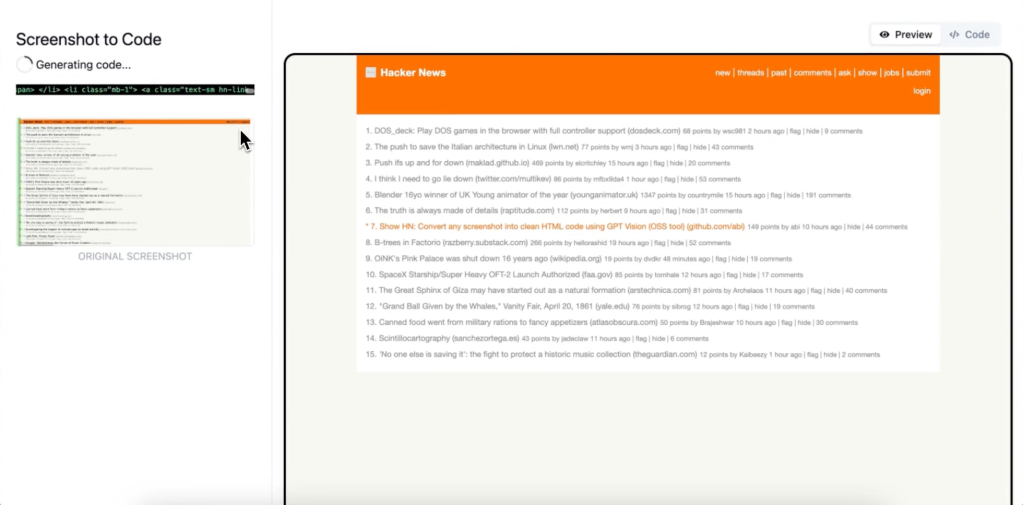
Figure has built a robot called Figure 01 that combines their robotics system with OpenAI’s GPT-4 and Vision to give it both visual reasoning and conversational abilities. Unlike other recent demos from major tech companies showing machine vision in a hypothetical real-world use, this appears to be legitimate (no editing and nobody is off screen remotely controlling the robot…) Everything it does is well within what’s capable of an advanced robotics platform utilizing GPT-4 for certain tasks.
Given the potential for robotics I thought it would be worthwhile to explore some of the ways GPT-4 and other vision capable models can be used in vision tasks.
Understanding GPT-4 with Vision
Let’s begin by understanding what it means when a system like GPT-4 is “vision capable.” When you give Vision (what we’ll call GPT-4 with Vision) an image or series of images (like sequential frames of a video) the image is broken down into “tokens”. Unlike text tokens however, these tokens don’t approximate to specific regions of the image like text tokens do with words (although they arguably don’t quite do this either – but that’s another discussion.) The best way to understand it is that the tokens are getting the “gestalt” or the wholeness of the image sans the specific details. If I ask you to describe the last restaurant you were at you might have some specific details but only vague information about the guests, decor and other aspects. This is because our brains make decisions about what information to keep and what to ignore. Vision works in a similar fashion. It does a pass over the image and tokenizes it based on what it was trained to focus on. This is kind of like how our hippocampus fires off when we enter a room and gathers critical details like spatial information.
One way to think about it is in terms of foveation – this is the feature of our own vision system where we have fewer receptors the greater the distance from our center of focus. The further away you get from the focal point of the eye the nerves are concerned less with fine details and more on movement – things that are advantageous in a potentially hostile environment. Vision has multi-dimensional foveation. It pays specific attention to certain aspects (Are there eyes in the photo? What are people doing?) and less to specific details like positioning.
Considerations
In addition to the reasoning limitations you have to take in other considerations. One is latency. GPT-4 with Vision takes a moment to analyze input and generate a response. In its current iteration this wouldn’t be practical for something like completely taking over a self-driving car or a high-speed assembly line, but can be used in conjunction with other systems to handle edge cases or be used to generate training data for smaller, faster models. Besides cost and latency, hallucination must be accounted for.
For more context, here’s the list of limitations in the Vision documentation at OpenAI.com:
Limitations
While GPT-4 with vision is powerful and can be used in many situations, it is important to understand the limitations of the model. Here are some of the limitations we are aware of:
- Medical images: The model is not suitable for interpreting specialized medical images like CT scans and shouldn’t be used for medical advice.
- Non-English: The model may not perform optimally when handling images with text of non-Latin alphabets, such as Japanese or Korean.
- Small text: Enlarge text within the image to improve readability, but avoid cropping important details.
- Rotation: The model may misinterpret rotated / upside-down text or images.
- Visual elements: The model may struggle to understand graphs or text where colors or styles like solid, dashed, or dotted lines vary.
- Spatial reasoning: The model struggles with tasks requiring precise spatial localization, such as identifying chess positions.
- Accuracy: The model may generate incorrect descriptions or captions in certain scenarios.
- Image shape: The model struggles with panoramic and fisheye images.
- Metadata and resizing: The model doesn’t process original file names or metadata, and images are resized before analysis, affecting their original dimensions.
- Counting: May give approximate counts for objects in images.
- CAPTCHAS: For safety reasons, we have implemented a system to block the submission of CAPTCHAs.
As you can see from the list, many of the limitations are due to the fact that the model isn’t encoding the relationship of every pixel to every other pixel (which is mathematically impossible), but instead focusing on broader details that can help with general reasoning.
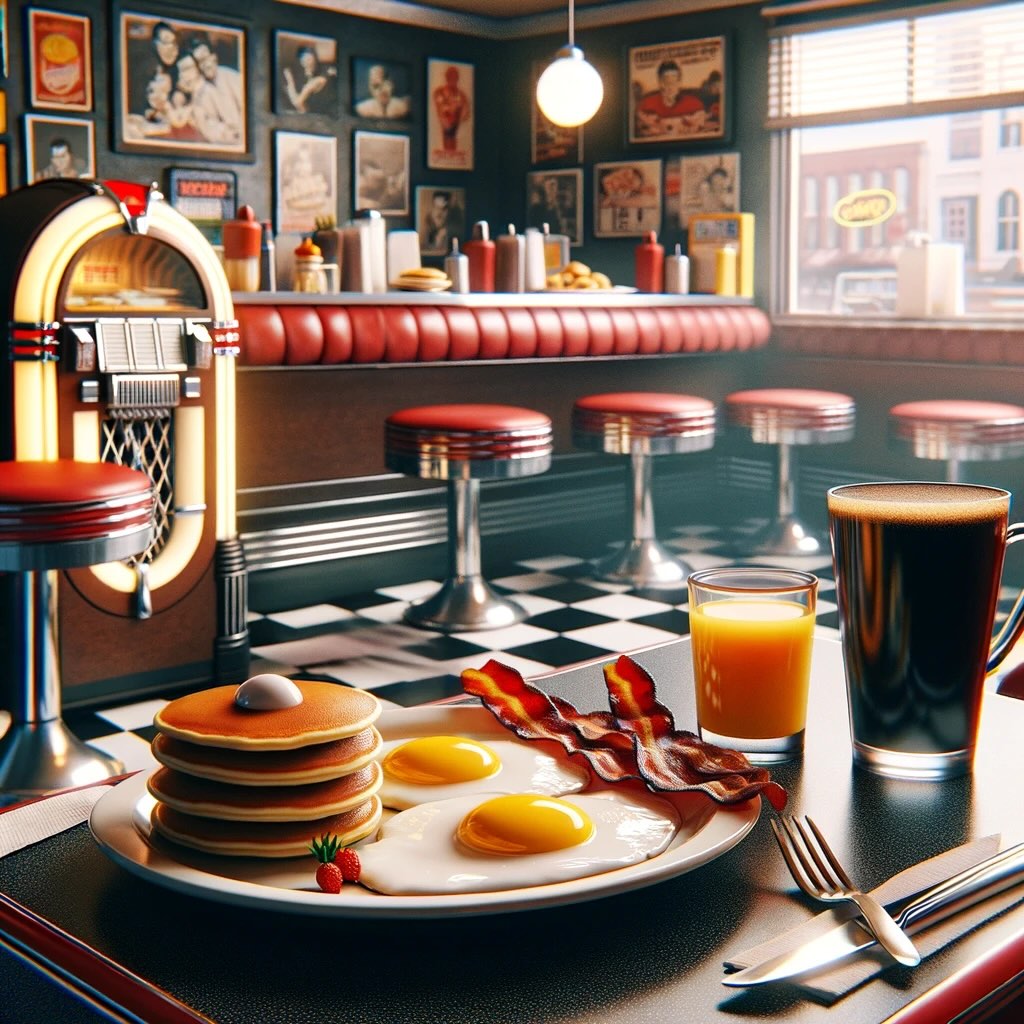
What does this mean in practice? Take the following image of a table setting. Vision might remember that there is a stack of pancakes, but have no idea how many. While it might miss certain details, as I demonstrated in my blog post Improving GPT-4’s Visual Reasoning with Prompting, there’s more information available than it may appear at first glance. You can prompt GPT-4 to reason more clearly about images and deduce position and other details – but there’s an upper limit.
Managing hallucination
The Vision model is quite capable but also prone to hallucination and can be quite verbose. A way to look at this is that the perceiving part of the model can see a lot, but the explanatory model will then make more out of what it knows than it actually does. You can see this in action as the Vision model takes a small detail like the color of socks and describes a character as having green tennis shoes. There are a few ways you can manage hallucinations.
1. Give the model tasks that are well within its known capabilities. The model is very good when there are a few objects in a scene and it’s easy to make out details. More cluttered images of complex interactions can be confusing.
2. Avoid open-ended questions. If you narrow down the way the model can respond you’re more likely to get a consistent answer. If I want to know what features are in an image you can provide a checklist.
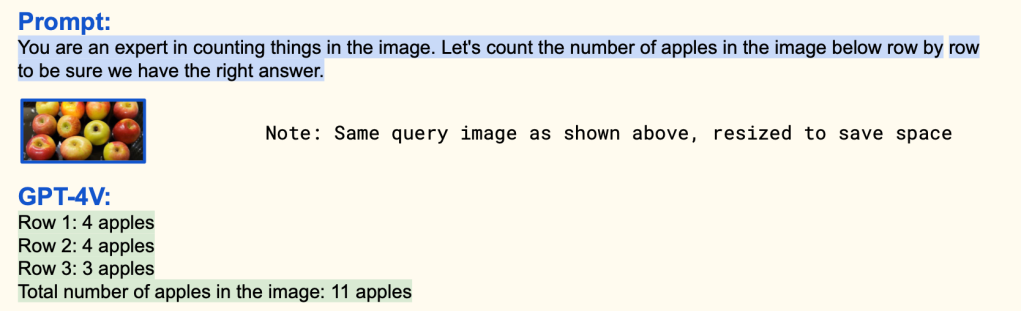
3. Use informed prompts. If you know something about the image you’re going to be sending to Vision it can be helpful to give as much context as possible to reduce the uncertainty. In this prompt example from a Microsoft paper on GPT-4 with Vision they illustrate how giving some guidance to prompt helps Vision answer a question correctly that it failed with just a simple query.
One of the challenges in working with GPT-4 with Vision is that it will sometimes refuse certain tasks because of the safety guard rails put in place to prevent misuse for solving captcha and other tasks. My personal hot take is that if an AI can solve your captcha, it’s really not a good captcha ( I have lists of things Vision and other multimodal models just can’t do yet and would make great captcha tests…) I’m sure this will improve in the near future, but it’s a consideration for anyone trying to perform any of the tasks below. You can work your way around some of the issues with prompting, but there’s no certainty.
Low detail setting versus the high detail setting
Vision has two settings that can have dramatically different results. In low resolution mode the entire image is converted into 65 tokens. For high resolution the image is scaled to fit into a 2048×2048 square then resized so the shortest side is 768px long and then broken up into 512px image tiles.
In this image from The Magic Puzzle Company there’s quite a lot going on. Trying to spot one feature can even be a struggle for a human.
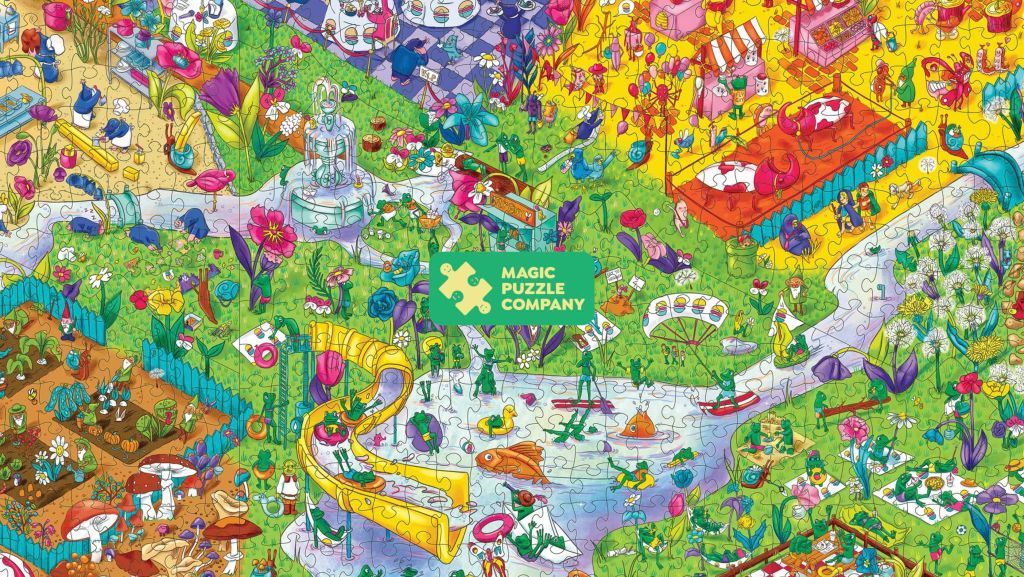
If I send the image to the “low” detail version of Vision and ask “Where are the balloons?” with a list of options, the response will be hit or miss. It just can’t “see” them because it doesn’t have enough information from the 65 tokens. However, if I ask the question with “high” detail enabled the model is able to answer correctly.
Low setting:
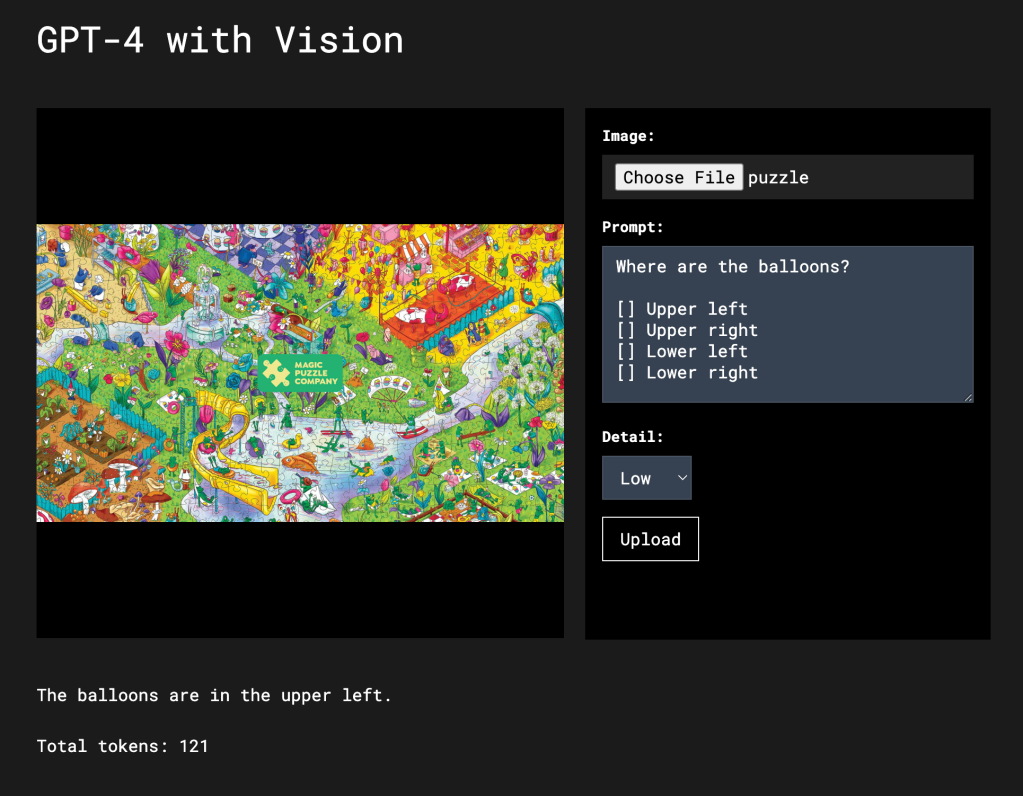
The low setting response appears to be no better than random.
High setting:
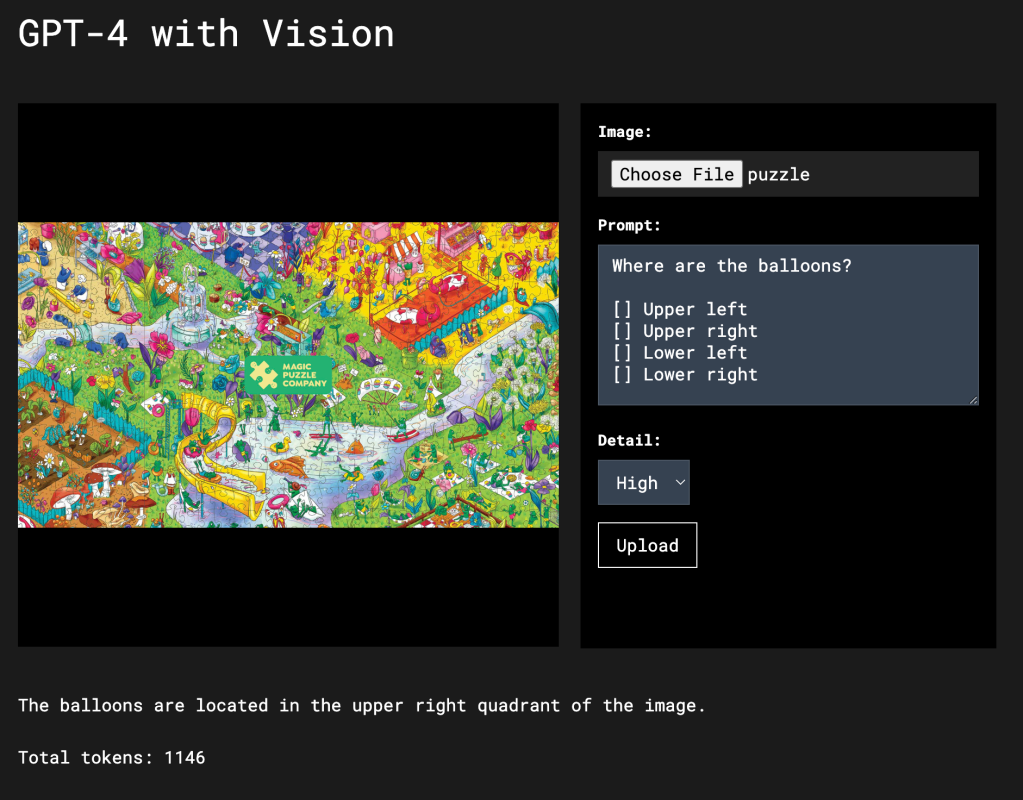
Vision spots the quadrant with the balloons 10 out of 10 times correctly.
Low detail versus high detail and Optical Character Recognition
If we assume that one image token can hold as much information as one text token (this is just an approximation for illustrative purposes – these tokens are very different) you can get an idea about the upper bounds for what these models are capable of. If I give Vision in the low setting an image of a page of text consisting of 350 words (approximately 490 text tokens) there’s no way it will be able to accurately convert all the words into 65 vision tokens. You will need to use the high resolution setting for a large page of text (assuming the print isn’t too small.)
Here’s the result of Vision in the low setting trying to do OCR on a page of text (~350 words):
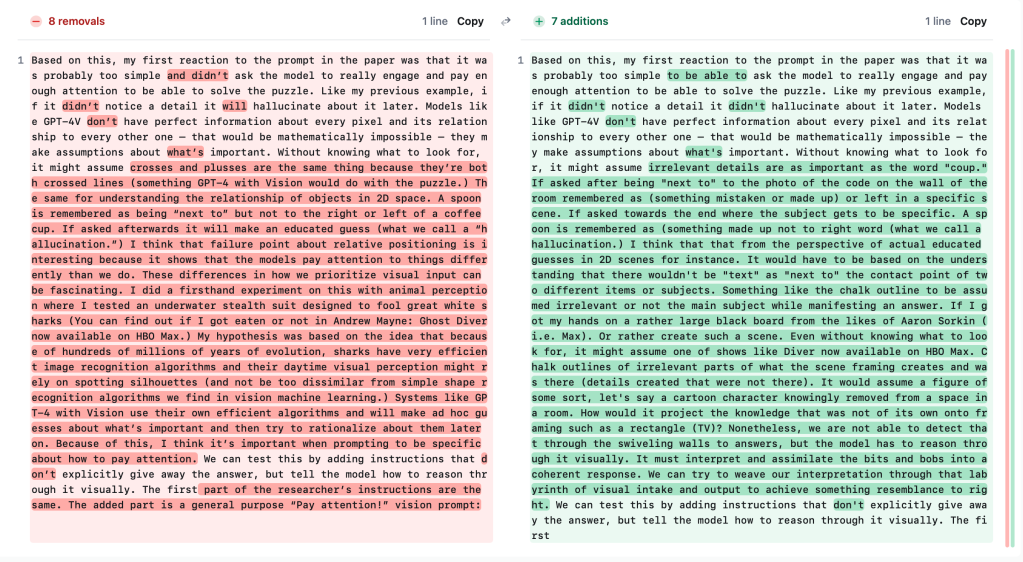
It manages to get a lot of the text right for only 65 image tokens – but does so by generalizing quite a lot and basically hallucinating between the gaps. You can see that it got the start and end but then botched the middle. All things considered, not bad given that the total number of input tokens was 98 (image, prompt and system instructions) and there are over 300 words in the image. Although not that useful either for this kind of complex task…
Now let’s try it in the high setting:
In the high setting Vision is able to score 100% accuracy in converting this page of text into characters. The total input token count was 1118 – over a thousand more tokens than was used in the low setting. This should give you some idea of how much more detail there is to be picked up in the high setting.
Handling large images, multiple images and video
Besides breaking down large images into tiles in the high setting, Vision can also handle multiple image inputs. You can use this to multi-shot prompt the model, have it do comprehension across images – like processing video frames or process multiple images inside a larger image. With the ability to use multiple images this means several use cases are possible:
Comparing multiple images at a time to spot matches
If I wanted to find out what image contained a specific object, like a specific style of shoe, I can provide an initial image as a reference image and several others to search through. If I then ask the system “What image has the object in the first image?”, Vision should be able to indicate which is the best match.
Time series
Aside from doing time series analysis like video (discussed below) you can use Vision with multiple images to match the progress from one image to another. If for example you wanted to provide descriptions of the growth of a flower or a cell culture, Vision can spot the changes between images.
Complex Classification
Besides looking for matches of a feature of a key image, you can provide several reference images showing different characteristics and then ask Vision to tell you what features are present in a query image. I’ve seen this used for electron microscopy tasks where specific features in different materials were being searched for in one material (i.e, porousness, cracks, etc.)
Map search
For very large images with lots of details you might want to break it up into smaller sections (more than using high detail does) and search each tile for what you’re looking for. For an effective search strategy you’ll want to have overlapping images for features that might get split when breaking the image down.
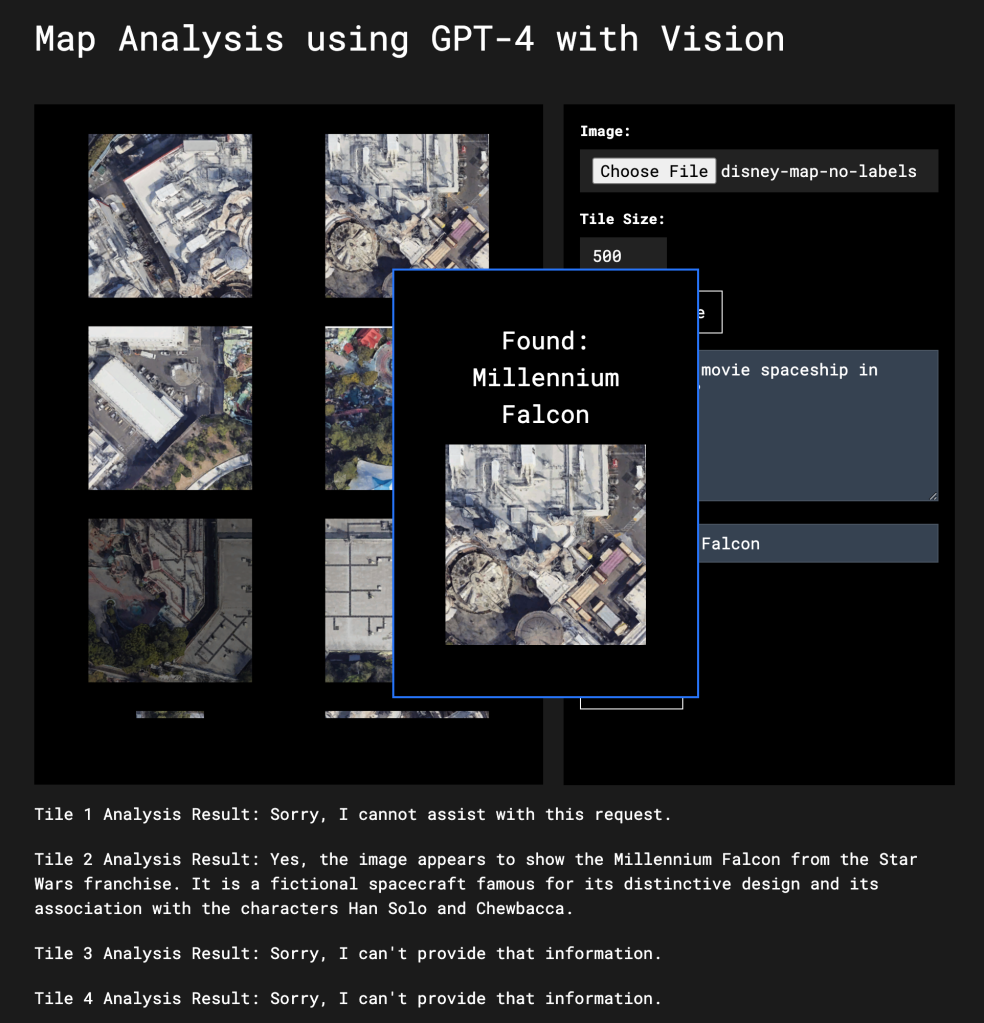
I’ve created a very simple application you can download and try yourself. The application lets you split up an image into tiles of any size you select and then provide a search term. Each tile is then sent to Vision and a keyword is searched for in the response text. In my example I use a Google Map image of Disneyland to search for the Millennium Falcon. I didn’t tell Vision to look specifically for the Millenium Falcon. Instead I told it to look for “movie spaceships” and the used “Millenium Falcon” as a key phrase to look for in the response.
Video processing
If you can handle multiple images or images within images your image model is by definition a “video” model as well. When I was at OpenAI and we launched GPT-4 with Vision we didn’t emphasize the video capabilities but they were there from the beginning. One of my toy demos was having the model determine dance moves from sequences of stills from a video. Like tiling, you have to determine the degree to which you want the video broken down – every frame, every 10 frames, once per minute, etc. This is how video comprehension works in other “video” capable systems. They’re not actually processing entire video sequences, but instead grabbing frames based on either a predetermined interval or using scene change detection to pick frames.
In this example using ChatGPT it breaks down a sequence of frames showing a golf swing inside a single image. Because we don’t need fine details about each frame, this allows you to “cheat” and process 12 images for the price of one.
We’re still in early days with video processing. OpenAI’s Sora text-to-video model uses “spatial-temporal patches” to understand video by tiling frame regions, having the tiles share information via a transformer network and then predicting them from frame to frame. You could use a similar method to decompose video into sequential information – even using it open-ended in real time.
That said, with some clever tricks you can get a lot out of GPT-4 with Vision in its current state. If I want to process multiple frames of video I can send them in batches to Vision. In this example I place 6 frames from the Dune 2 trailer taken every few seconds into a single image and send that to Vision using the low setting. It’s able to tell me with reasonable accuracy which frame I’m looking for. To help Vision the frames are numbered. Without the number the low setting might be off one or two places. Methods like numbering can be helpful, but be careful about trying to overload the model with too much visual data.
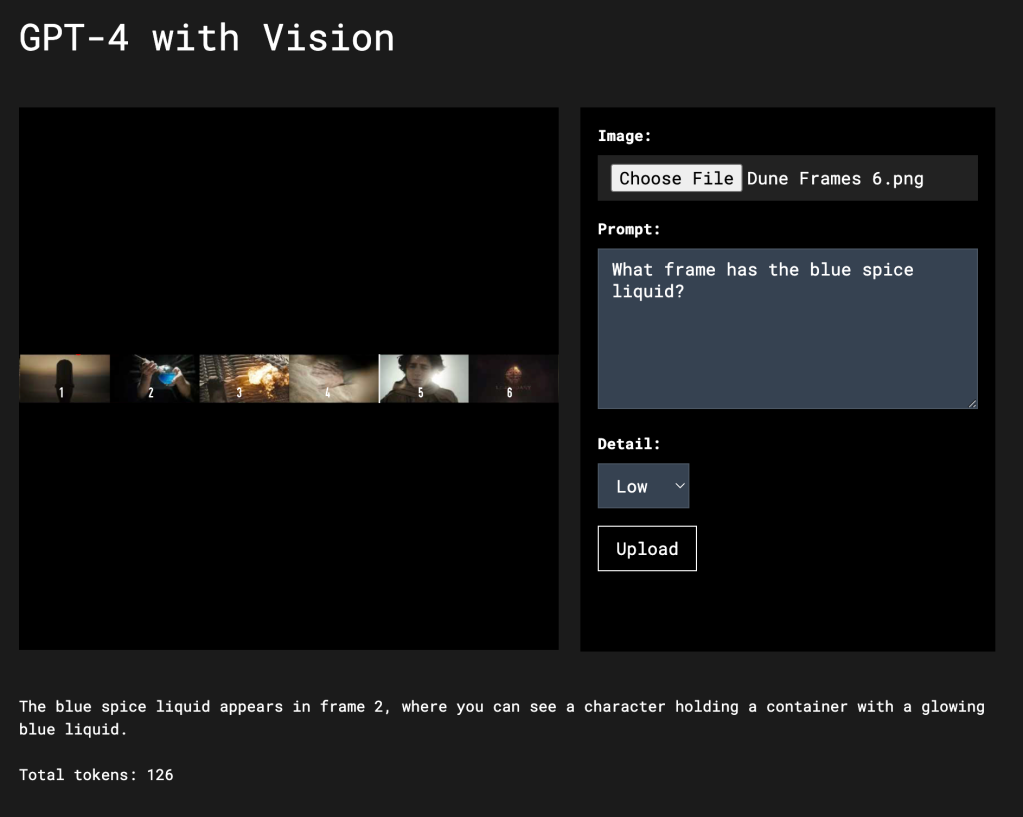
Using the low setting Vision was able to scan all six frames at once and return the correct answer for a total of 122 tokens.
If you use the low setting and send multiple frames at a time you can split an hour of video into 1,800 frames (one frame every 2 seconds), group them in batches of 6 and process the entire video for under $2.00. You could process every frame of a two hour film for around $30.
GPT-4 with Vision and Robotics
This is the real reason I wanted to write this article. I think that we’re going to start seeing a lot of advancements in robotics in part because of the recent advances made in language models like GPT-4. The demonstration of the Figure 01 robot above is a very direct example of what happens when you combine state of the art robotics with LLMs. While we haven’t yet seen widespread use of transformer architectures in robotics (Tesla only recently switched to a transformer architecture for self-driving), that’s probably going to change very soon.
For robotics, where real-time processing is critical, we’re probably going to see a lot of hybrid systems like Figure’s where lower-level systems handle the fine precision for grasping objects and GPT-4-level systems handle the general reasoning and task comprehension. I think this splitting between higher and lower functions will always be the case. Even the human nervous system is divided up like this. As I write, I’m not consciously thinking about where to move my fingers as I type – that’s what “muscle memory” is for. The same for robotics. A system like GPT-4 will understand the request from a user, spot the dishes in the dish rack and then use a system like YOLO or CLIP and an image segmentation system to tell the hand where to grasps the dish.
Another factor is that what we’ve recently learned from building intelligent systems can be applied to hardware in novel ways. One of the biggest costs in robotics is the sensory mechanisms used to help understand how much force to apply and the position in space. We’ve seen how reinforcement learning systems and self-play can improve this. If you add a system like GPT-4 to the mix that’s able to oversee millions of tests and evaluate performance, we can get a large model teaching a smaller model how to achieve precision with less expensive parts. A system can “learn” where its arms and fingers are in space with high precision through visual input or using inexpensive strain gauges.
What is a robot?
A robot is a machine able to:
1. Take directions
2. Understand its physical embodiment in the world.
3. Have the ability to execute actions in physical space.
All three are critical. Systems like GPT-4 can be useful at each stage – even ones that have to run in real-time by adding an assist or helping train smaller systems.
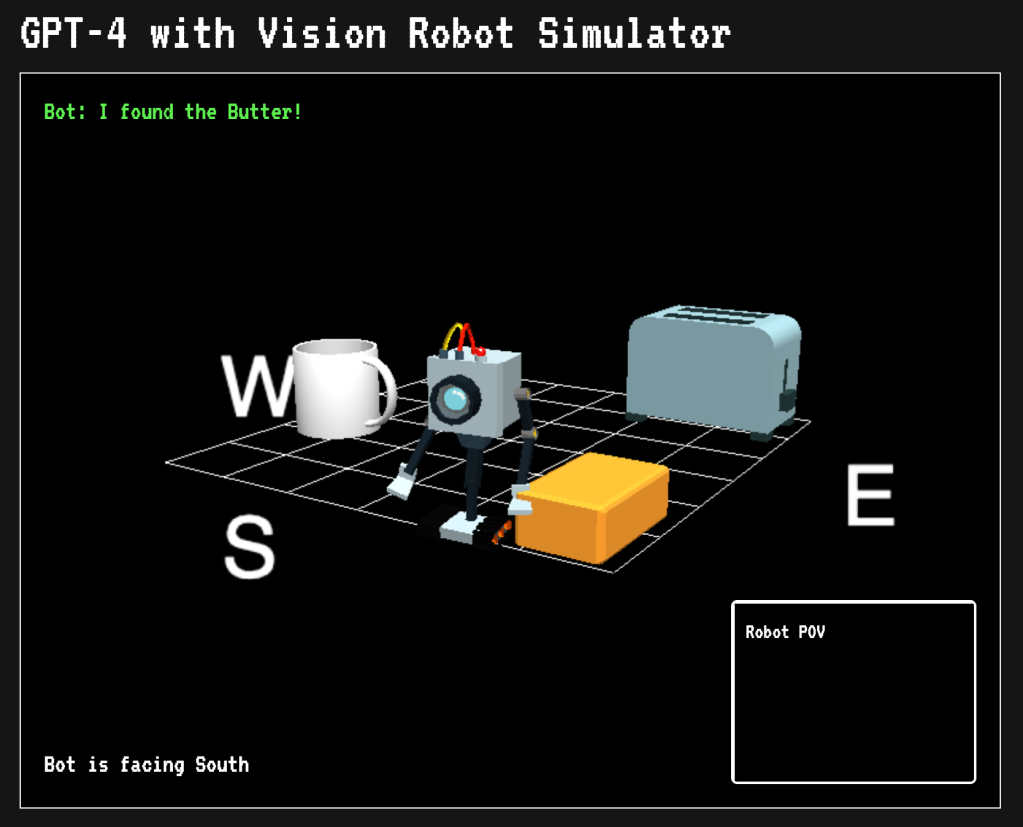
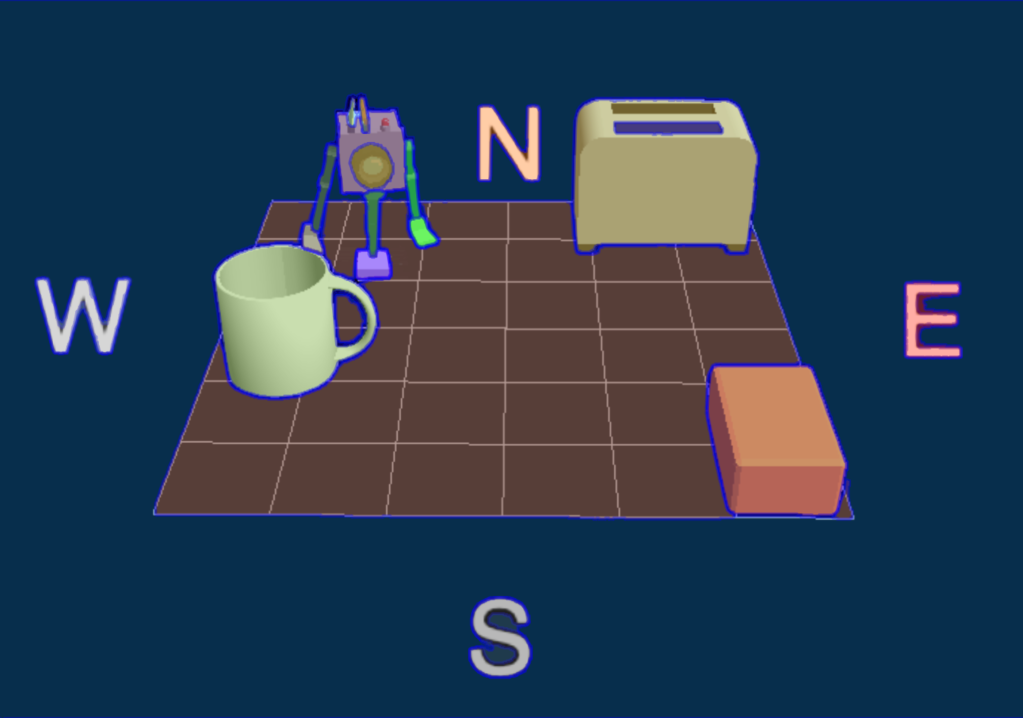
To demonstrate some of these concepts I’ve built a simulator that uses GPT-4 with Vision to guide a robot around a scene to achieve an objective. In this instance the task is finding the butter on a table. You’re welcome to download the code and play with it yourself or modify it however you like.
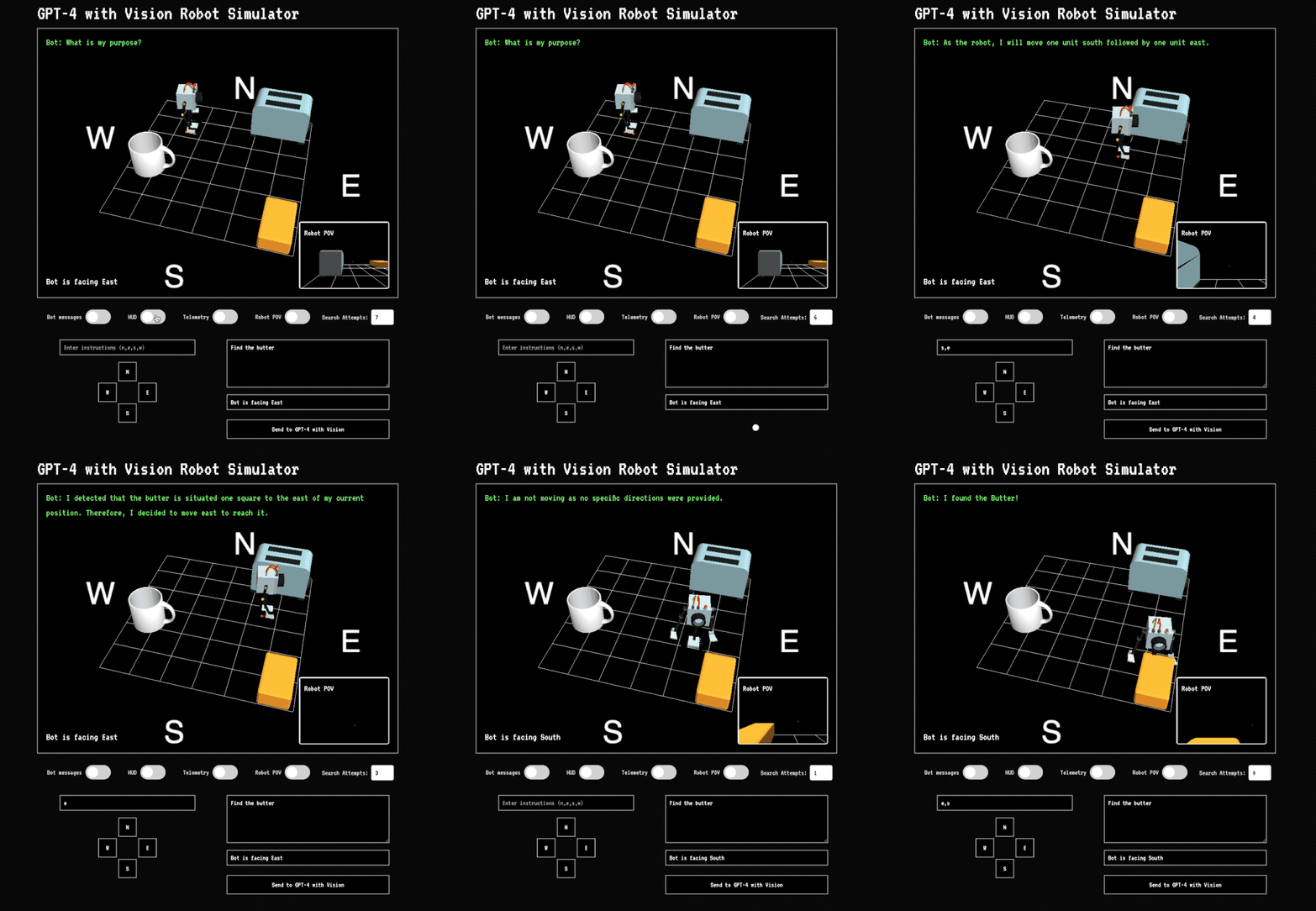
The application simulates a 3D environment set on cardinal points and offers two camera views. One is a view from above that you can adjust with your mouse. The other is a camera attached to the robot that shows you what it sees. There’s also basic telemetry that keeps track of which direction the robot is facing. You can select what data to send to GPT-4 with Vision and the number of attempts.
Let’s take a look at how it works:
Step 1: Process instructions
You give the robot an instruction in natural language like “Find the butter but avoid the toaster.” This combines requirements 1 (taking directions) and 2 (understanding its environment) we previously mentioned. You can also select to use low or high detail mode. GPT-4 takes your prompt, the image sent to it as well as telemetry data and has to reason out what you meant by “butter”, what is the robot as well as the other objects in the scene. All it has to go on is the image and your prompt. It’s up to Vision to figure out what you meant and identify the relevant objects in the scene and know that the yellow brick thing is the butter. Vision also has to estimate their position in 3D space.
Based upon its understanding of the scene from the image, prompt and telemetry, Vision makes a plan to move the robot towards the objective (in this case the butter.) Its system instructions tell it to provide directions in the form of cardinal movements. For example, going two squares north then west would be n, n, w. I also have it reason out an explanation for its decision.
These are the system instructions:
You are GPT-4 with Vision and can read images.     Return instructions for helping the robot find the object using n,s,w,e.

One direction equals one tile.

(Example n, n, w = north 2 squares then west 1).     Acceptable direction format is n,w,e,
Step 2: Process response
After Vision makes its decision, I use a second call to GPT-4-Turbo to process the output to make sure that it’s in the proper JSON format. This is a bit superfluous, but GPT-4 with Vision doesn’t currently support returning in JSON format. The extra step ensures that I’ll get functioning instructions. Although it does slow things down a lot.
Step 3: Move the robot
The instructions are sent back to the application and the robot is moved across the grid. If it touches an object a message is displayed. After the robot has finished moving a new image is taken of the scene and sent back to Vision. In this version I don’t send prior images back or provide any kind of history. Vision is acting in a stateless manner and has no idea how previous instructions put the robot in its current position. Even still, it’s able to find the butter because each set of instructions usually takes it closer.
The success of the task depends heavily on the position of the camera. As pointed out earlier, Vision struggles with understanding object position. In a situation like this where you’re asking to plot the movement of an object in 3-dimensional space based upon a 2-dimensional image it has to make a lot of guesses about where objects are located and how to formulate instructions. You can tell that it has some understanding of the scene because it’s usually able to get the robot to the butter.
My prompt and system instructions are very basic and can be improved a lot. The goal was to show that even with a simple set of instructions Vision can perform all three tasks for an embodied autonomous agent (at least in a simulated environment.)
As part of a larger system, GPT-4 with Vision and similar models can help improve the capabilities of robotics applications by giving them the ability to understand natural language instructions, reason about visual information, create plans and self-check to make sure they’re being executed properly.
Using our little simulator as an example, there are several ways you can improve upon this and lessons to be learned about scaling this to real robotics.
Prompting & System instructions
We’re still at the dawn of language models and even more so multimodal models. I’ve noticed in some research papers probing the capabilities of visual models that the prompts could be improved for greater results. I think this is a sign of that fact that even four years into prompting as a recognized method a lot of knowledge is still anecdotal.
The prompt and system message for our bot is very basic and not as instructive or efficient as it could be. There’s opportunity for improvement with general prompt improvements like asking Vision to study the scene, list the objects and then make a plan. Or you could use very task specific prompts like instructing the system to create an array to represent the state of the environment and then make decisions based on that.
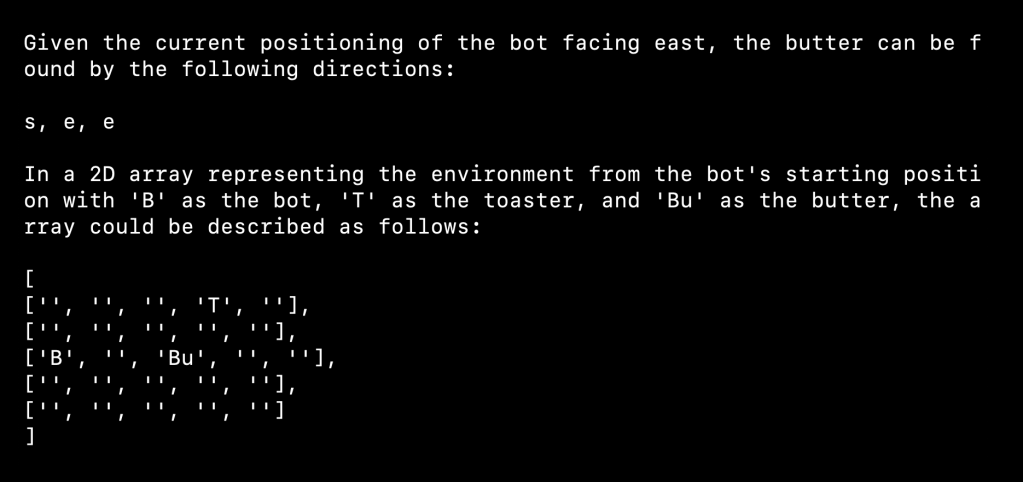
Without giving it any other scene descriptions, if you ask Vision to use an array to keep track of position it will often create a 5×5 array – even though the grid is 6×6:
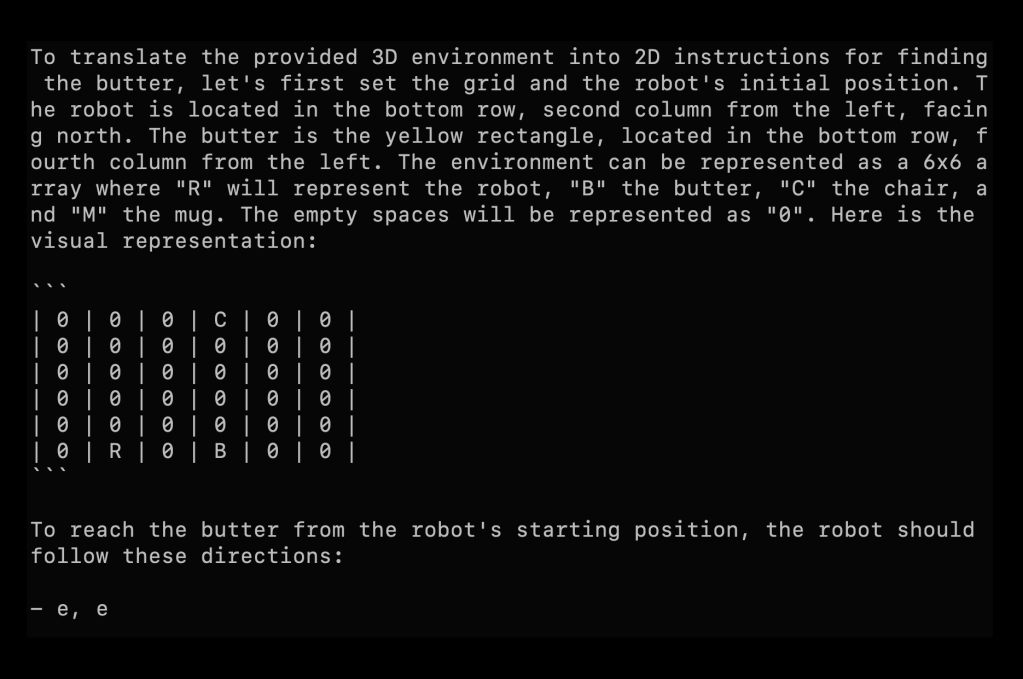
If you tell it the size of the grid it’s able to more accurately represent the grid, although with limited prompting and the view at an oblique angle, not represent it well. I’m hopeful future versions of Vision will have much better spatial awareness:
Using agent-based approach with history
If you provide Vision with feedback in the form of images of previous positions and instructions, the system will have a better understanding of how to make better choices when it moves the robot. This is probably the most important improvement you can add. An important consideration is how much information you want to send to Vision. You don’t want to overwhelm it with details, but provide enough data to correct previous assumptions.
You might also consider using Vision purely for scene comprehension and optimize around that then send that data to GPT-4 or even GPT-3.5 to plot the directions for the robot. This would allow Vision to focus solely on understanding the positioning of objects in the environment.
Breaking the scene down into smaller sections
Similar to our map application, we can divide the scene into smaller sections and ask Vision to identify the objects in each tile. We then have to map this back into 3D space, but if we understand the camera angle and distance, we can probably reasonably approximate the position of each object relative to the robot.
Using a hybrid approach with other vision models
Vision is really good at general image reasoning but not as good at understanding position and other details. While that may improve in the future, even then for applications like robotics, it will make sense to use a hybrid approach where smaller faster models perform tasks like depth estimation and segmentation.
Using Meta’s Segment Anything model we can get outlines of all the objects in the scene along with positioning data. If you then ask GPT-4 with Vision to label each object you would have a pretty good idea about the layout. If you also add in a depth estimation and/or plane finding you could create a pretty good representation of the objects as they really are in 3D space.
Conclusion
GPT-4 with Vision is a transformative leap in AI and image processing, particularly for the domain of robotics and multifaceted applications. This integration of visual processing with advanced language and reasoning capabilities opens up many opportunities for innovation. However, to harness the full potential of this technology, it’s crucial to understand its strengths and limitations.
GPT-4 with Vision excels in tasks that combine visual perception with contextual reasoning, making it ideal for applications like interactive robotics, automated content generation, and enhanced analytical systems. However, its effectiveness can be hampered by intricate spatial reasoning, detailed image analysis, and rapid real-time processing needs. To optimize performance, users should familiarize themselves with the model’s specific strengths, such as recognizing objects and interpreting scenes, and be aware of limitations like handling complex spatial arrangements or processing high-speed real-time data.
Given these constraints, designing applications that play to the model’s strengths while mitigating its weaknesses is key. For better results, leverage the model for tasks that require a combination of visual understanding and contextual interpretation, avoid relying on it for applications that demand precise spatial awareness or immediate real-time decision-making, and integrate it with specialized systems or sensors for tasks beyond its optimal capabilities.
Practical Tips for Enhanced Outcomes:
To achieve the best outcomes when using GPT-4 with Vision, consider the following tips: Use clear and focused prompts to guide the model’s attention and reduce the likelihood of hallucinations or irrelevant responses, enhance image clarity and detail before analysis to improve the model’s accuracy in interpretation, and combine GPT-4 with Vision with other AI technologies or traditional algorithms to cover its limitations, particularly for tasks requiring fine-grained detail or rapid processing.
If you’d like to try the different applications I created for this post, you can download them from GitHub:
GPT with Vision interface You can play with the low and high details settings in GPT-4 with Vision using this.
GPT-4 with Vision Robot Simulator This is a very simple robot simulator you can use as a starting point.
Map Vision This application breaks images into tiles and searches for features.
 @AndrewMayne